

Today we are happy to announce the release of ShapeBlue Topology Studio. ShapeBlue Topology Studio is an infrastructure visualisation and network design tool for Apache CloudStack, available to all ShapeBlue customers. Built on 15 years of ShapeBlue’s collective CloudStack knowledge, it offers two modes: Visualise, which provides a live, read-only map of your existing cloud infrastructure, and Design, which lets you create Guest Network designs that follow CloudStack’s rules and export them as Terraform or CloudMonkey scripts.
Through our work designing, deploying and supporting CloudStack environments, our teams have encountered two recurring problems that shaped the development of Topology Studio.
The first is seeing what you already have. CloudStack holds information about the whole deployment: Zones, Pods, Clusters, Hosts, Storage, Physical Networks and System VMs, plus the Guest Networks, Routers and VMs running on top of them. But you only get that information one screen or one API call at a time. To answer simple questions like “which Host runs this VM?” or “which Router serves this Network?”, you have to rebuild the picture in your head.
The second is designing what comes next. A new Guest Network usually starts as a sketch, which someone then turns into automation by hand. Generic diagram tools accept any shape you draw, but not every shape works in CloudStack, so mistakes may only become apparent at build time.
The ShapeBlue approach follows a simple principle: everything CloudStack knows, drawn for you; everything you want to build, drawn by you. Visualise connects the infrastructure into one view, from the Zone down to each Host and the VMs on it. Design brings CloudStack’s rules into the drawing process, helping operators turn a network sketch into a deployable configuration.
ShapeBlue’s shared knowledge shaped how these components work together: how CloudStack objects appear, how they fit inside each other, and how infrastructure and Guest Networks are presented. Through the team’s work on the concept, proof of concept and product development, we have translated that experience into a practical tool for cloud operators.
Today we’re releasing ShapeBlue Topology Studio v0.1.0, the newest addition to the ShapeBlue CloudStack Infrastructure Support Service. It helps cloud operators understand what they have and design what comes next. By bringing infrastructure and its relationships into one live view, it helps operators see where workloads run and how resources connect, spending less time piecing information together across multiple screens or API calls.
Visualise: see what you’re actually running
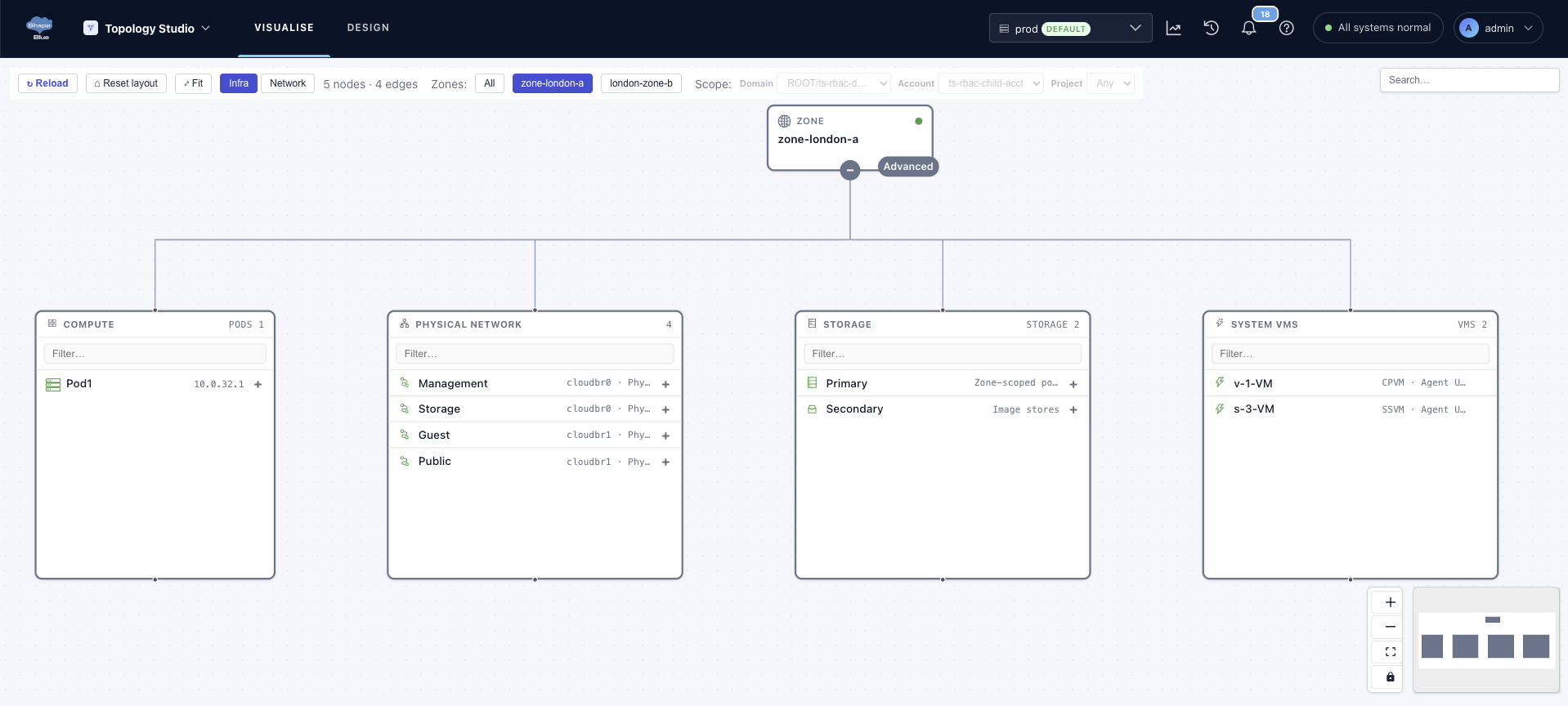
Visualise connects to a live CloudStack environment and draws a map you can drill into. It’s read-only by design: the code checks every CloudStack call against a list/query allowlist before sending it, so safety doesn’t depend on the permissions of the account you connect. It has two views that follow how CloudStack itself is organised:
- Infra view draws the physical architecture top down: Zones, Pods, Clusters, Hosts, Primary and Secondary Storage, Physical Networks, Traffic Types, VLAN IP Ranges and System VMs, with the virtual elements running on them.
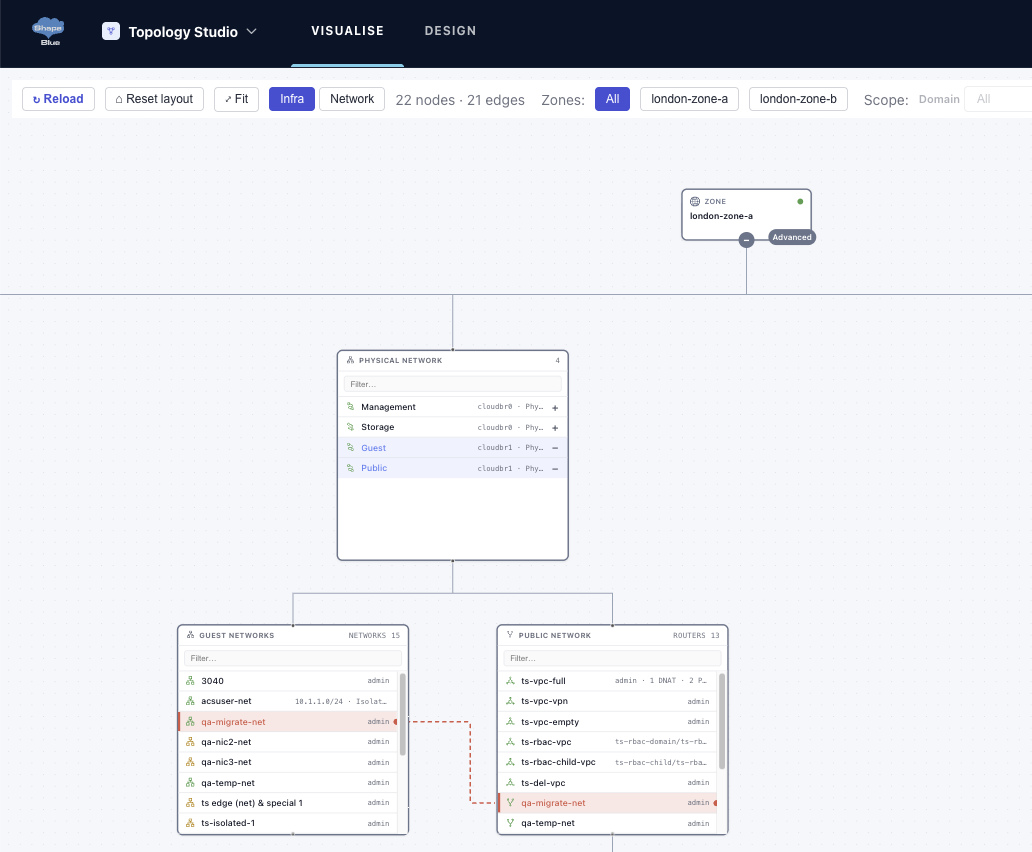
- Network view shows each Zone’s Guest Networks: VPCs and Tiers, Isolated, Shared and L2 Networks, Routers, Public IPs with their Port Forwarding, Static NAT and Load Balancer Rules, VM Groups and Site-to-Site VPN.
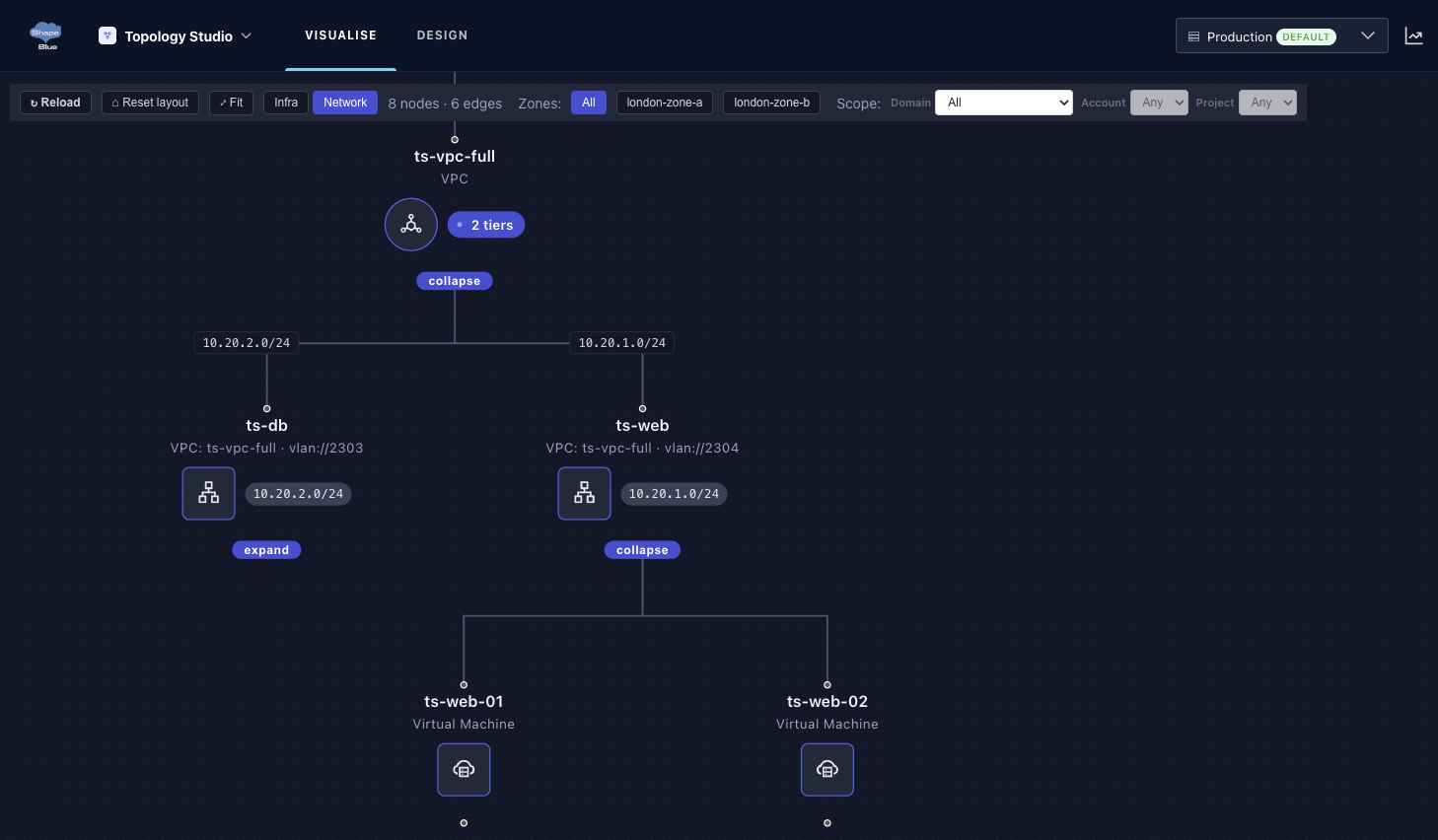
Objects load when you expand them, so large deployments stay fast. Search jumps straight to a match, and right-click takes you between related objects, for example from a VM to its Network and on to its Router, or from a System VM to its Host. A side panel lists every CloudStack field for the selected object. The canvas starts locked, so you can’t rearrange a live map by accident.
Design: draw guest networks that follow CloudStack’s rules
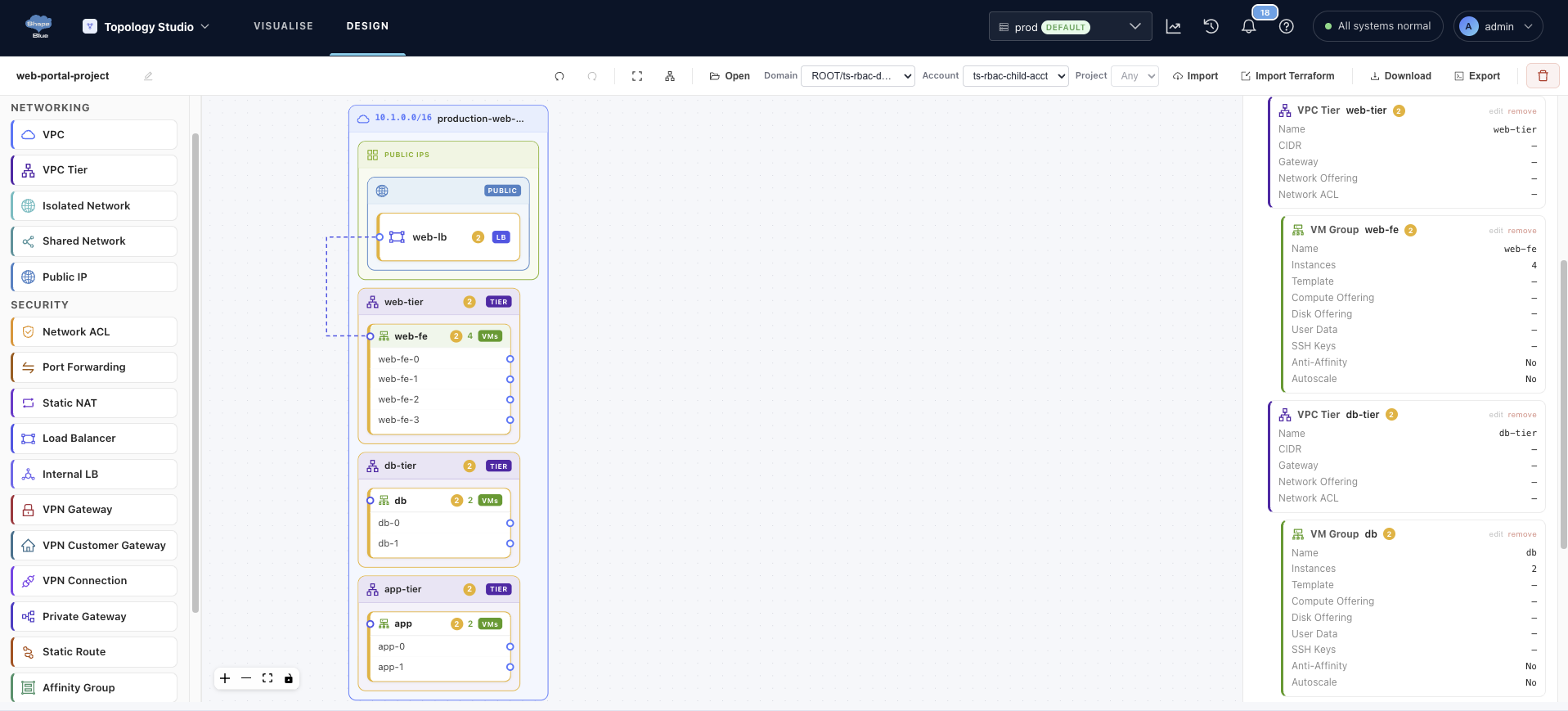
Design is where a new Guest Network starts. The canvas checks CloudStack’s rules while you work: the palette only shows what’s valid at that point, and if you drop something in the wrong place, Topology Studio rejects it and tells you why. That way you catch mistakes while drawing instead of when you build.
You can design Networks and VPC Tiers, VMs and VM Groups, Public IPs with Load Balancing, Port Forwarding and Static NAT, Network ACLs, Firewall and Egress Rules, VPC Private Gateways with Static Routes, Affinity Groups, Site-to-Site VPN and AutoScale. Dropdowns are filled with real data from your CloudStack environment instead of raw IDs.
You don’t have to start from scratch. You can load an existing Network in three ways: live from CloudStack, from a Terraform file you exported earlier, or from a saved design.
Export: take it away as Terraform or CloudMonkey
Any Guest Network you design or import can be exported as:
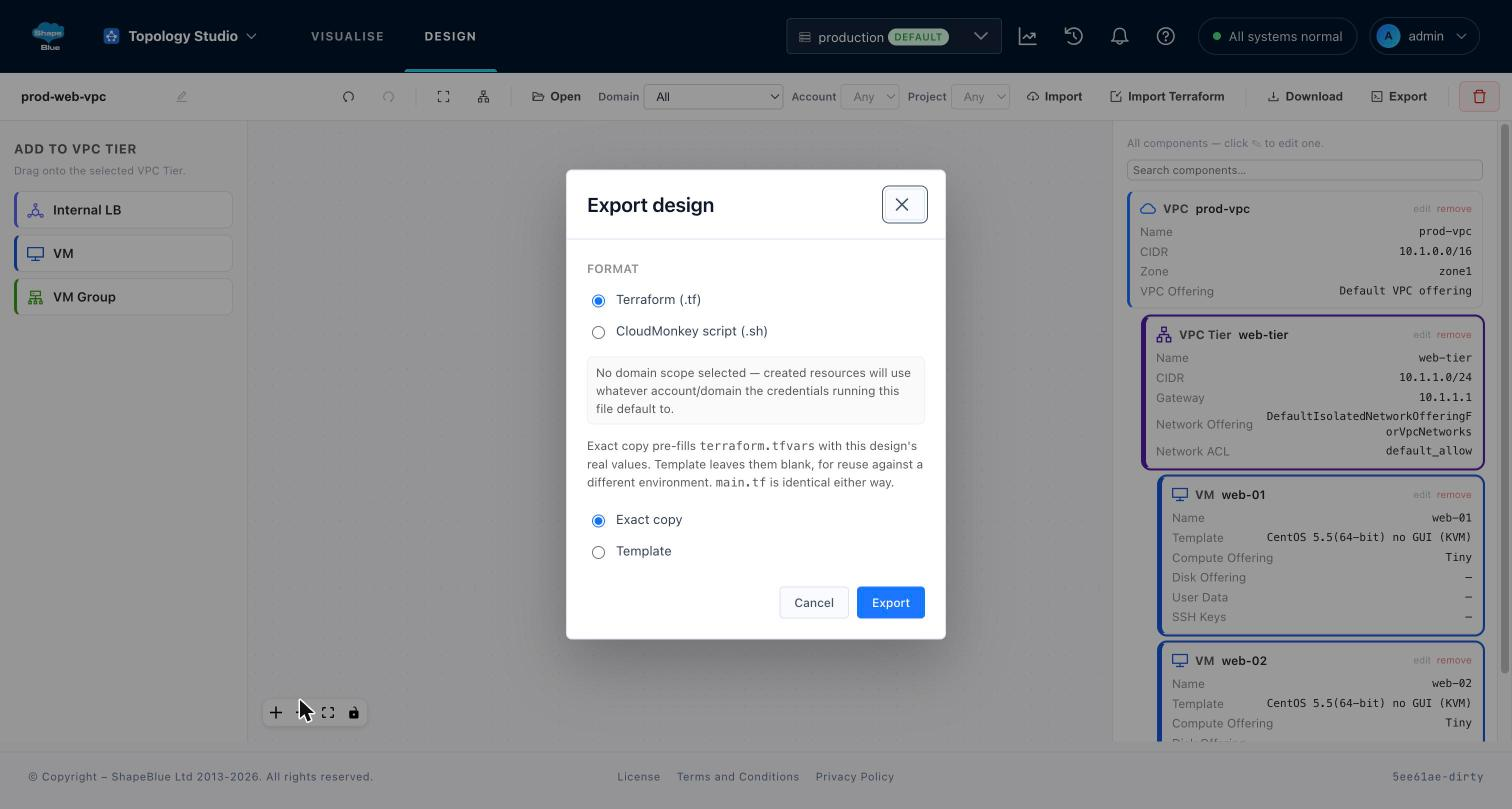
- Terraform: a zip with tf, providers.tf, variables.tf and terraform.tfvars
- CloudMonkey: a single runnable .sh script
For resources that already exist, the Terraform output includes import {} blocks. Apply it against the same environment and Terraform adopts those resources instead of creating duplicates, so a Network built by hand can be brought under Terraform. Choose Exact copy to keep this environment’s values, or Template to leave them out so one design can be reused elsewhere.
Export only creates files, and Topology Studio never makes changes in CloudStack. Running the output is a separate step you take yourself.
What to know about this first release
- Design covers the Guest Network layer. It doesn’t author physical infrastructure.
- You can scope a design to an existing Project, but you can’t create new Domains, Accounts or Projects yet.
- Terraform export supports Project scoping only. CloudMonkey export supports Domain and Account scoping too.
- The CloudMonkey command for Internal Load Balancers is a best-effort placeholder in this release, flagged in both the script and the docs. Every other rule type has been tested against a real CloudStack lab.
- Light theme only. Undo and Redo use buttons and are limited to 100 steps.
- Tested with CloudStack 4.22.1.0. Topology Studio relies on documented API fields and the Terraform provider schema, not a fixed version check, so nearby versions should work. No supported version range has been set yet.
How to get started with ShapeBlue Topology Studio
Topology Studio is available as part of ShapeBlue CloudStack Infrastructure Support Service. Contact us for a demo or evaluation! Email us at info@shapeblue.com.

Marco Sinhoreli is a seasoned Principal Technical Marketing Manager at ShapeBlue, with over 25 years of IT experience. As an Apache CloudStack expert and committer, he specializes in creating and delivering technical marketing content that bridges the gap between technology and business. Marco has consulted major companies on implementing IaaS solutions with CloudStack, focusing on delivering cloud infrastructure that supports both immediate and long-term business needs. When he’s not diving into cloud solutions, Marco loves playing guitar, exploring new places, and staying updated on politics.

