
ShapeBlue Topology Studio
Visualize, design & export CloudStack deployments. See your CloudStack infrastructuere as a live map, design guest networks on a canvas and export them to Terraform or CloudMonkey.
CloudStack Infrastructure, Mapped. Network Designs, Ready to Build.
Understanding how a CloudStack deployment fits together often means switching between screens to check which network a VM uses, which router serves that network and which host runs the VM. Manually drawn diagrams become outdated as the environment changes, while recreating guest networks through the UI means repeating configuration steps.
ShapeBlue Topology Studio is a read-only visual tool for Apache CloudStack with two modes: Visualise, a live top-down map of a whole deployment, and Design, a drag-and-drop canvas for guest networks that gives you the code to build them.
Key Facts
ShapeBlue Migrate
Read-only visual tool for Apache CloudStack: a live map of a deployment and a canvas for designing Guest Networks. Developed by ShapeBlue and part of our CloudStack Infrastructure Support service.
Platform Overview
Runs on the ShapeBlue Appliance and reuses the CloudStack environments already registered there. No separate login, no database.
Topology Stuido Modes
Visualise, with an Infra view of the physical layer and a Network view of Guest Networks. Design, a drag-and-drop canvas that applies CloudStack's containment and reference rules as you draw.
Read-only Overview
Enforced in the Topology Studio own code. Every CloudStack call is checked against a list and query allowlist before it is sent.
Export Capabilities
Terraform or a CloudMonkey script. Exact copy adds import {} blocks that adopt existing resources, static routes aside. Template leaves the values out for another environment. You run the result yourself.
Suitable For
Cloud Service Providers and Enterprises running Apache CloudStack: operators, support engineers, cloud architects and professional services teams.
How Topology Studio Works
No single transport fits every workload. Choose per VM or per wave, based on disk size, storage layout, network links and how much downtime each workload can take. Three of the four need no VDDK: only the VDDK method itself requires the library, and CBT uses it only where a datastore is not NFS-backed.

Simple Connection
Topology Studio is part of the ShapeBlue Software Tooling. It reuses the CloudStack credentials your organisation has already registered. No separate login required.

Visualise in Seconds
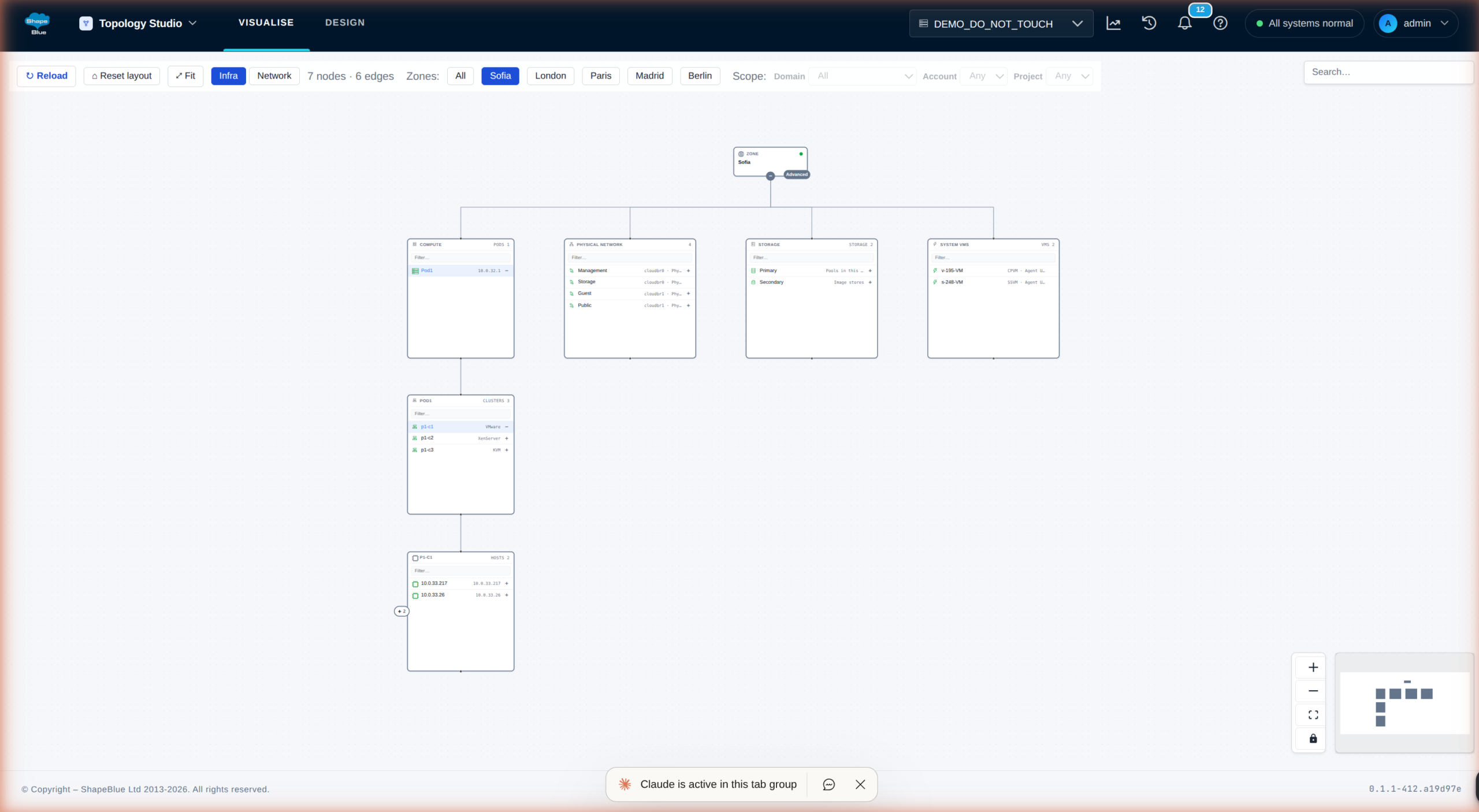
The Infra capability inside Topology Studio draws the physical architecture from the zone down through pods, clusters, hosts and the VMs on them. Network draws each zone’s guest networks.

Design or Import
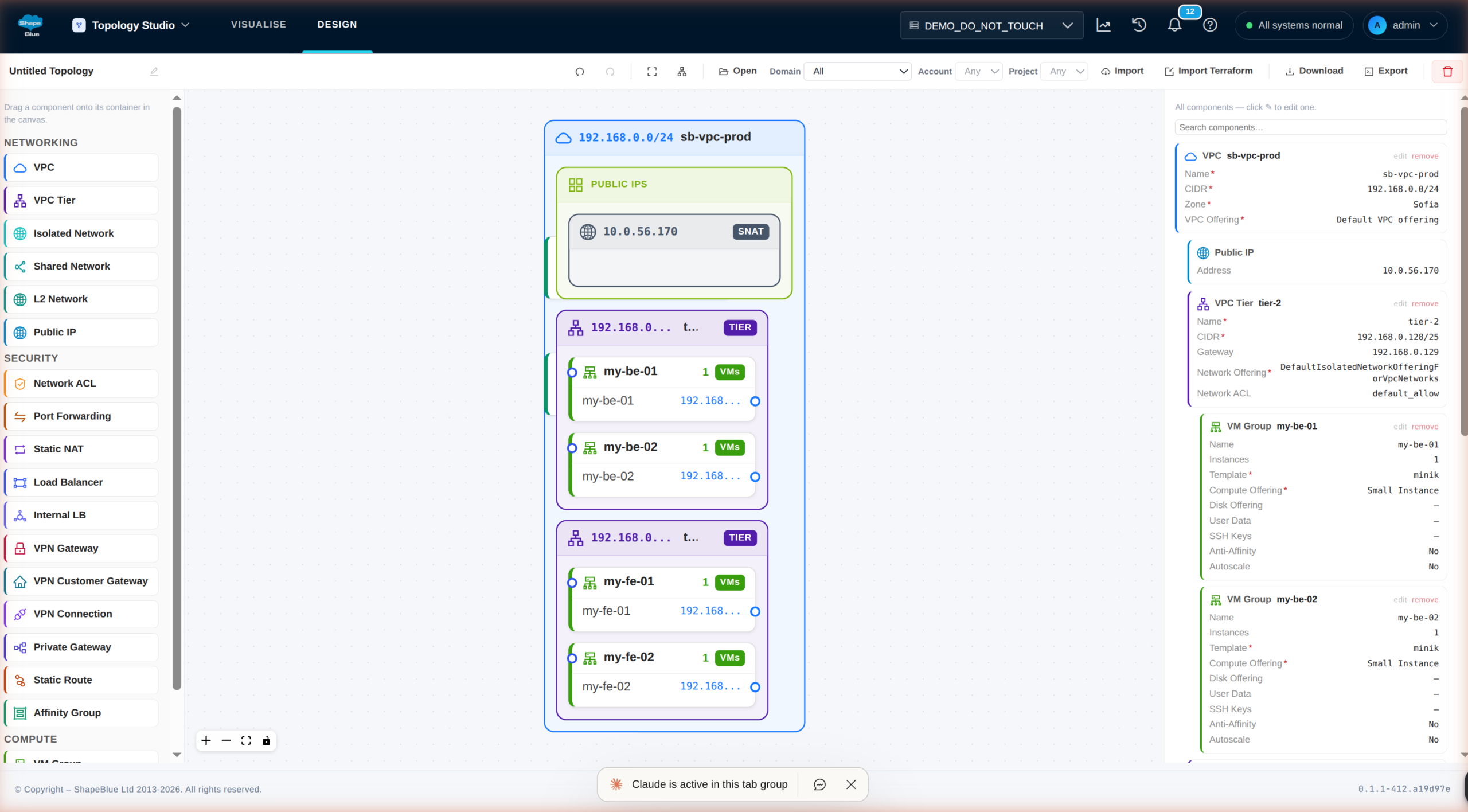
Start on a blank canvas, or import a live VPC or network and have it reverse-engineered into the same editable model as anything you draw.

Validate the Result
The canvas applies CloudStack’s own containment and reference rules. A shape CloudStack would refuse is refused on the canvas, not hours later at build time.

Export as a Script
Terraform or a CloudMonkey script, as an exact copy of this environment or as a template with the environment-specific values factored out.
Solving Virtualization Challenges with ShapeBlue Topology Studio
View the Full Deployment
The information is all there, but the full map only comes together once everything is organised visually, in one place.
Less Manual Work
Which network a VM sits on, which router serves it, which host runs it. All in one place, easy to reach and easy to understand.
Networks That Work
Generic layout tools accept any shape you draw, but not every shape fits CloudStack. That gap is closed.
Designs You Can Reuse
A hand-built network cannot be reviewed, versioned, replicated or handed over. With Topology Studio you are in control.
No Riskst at Production
Topology Studio shows you everything, with no way to alter your production environment.
See it in Action
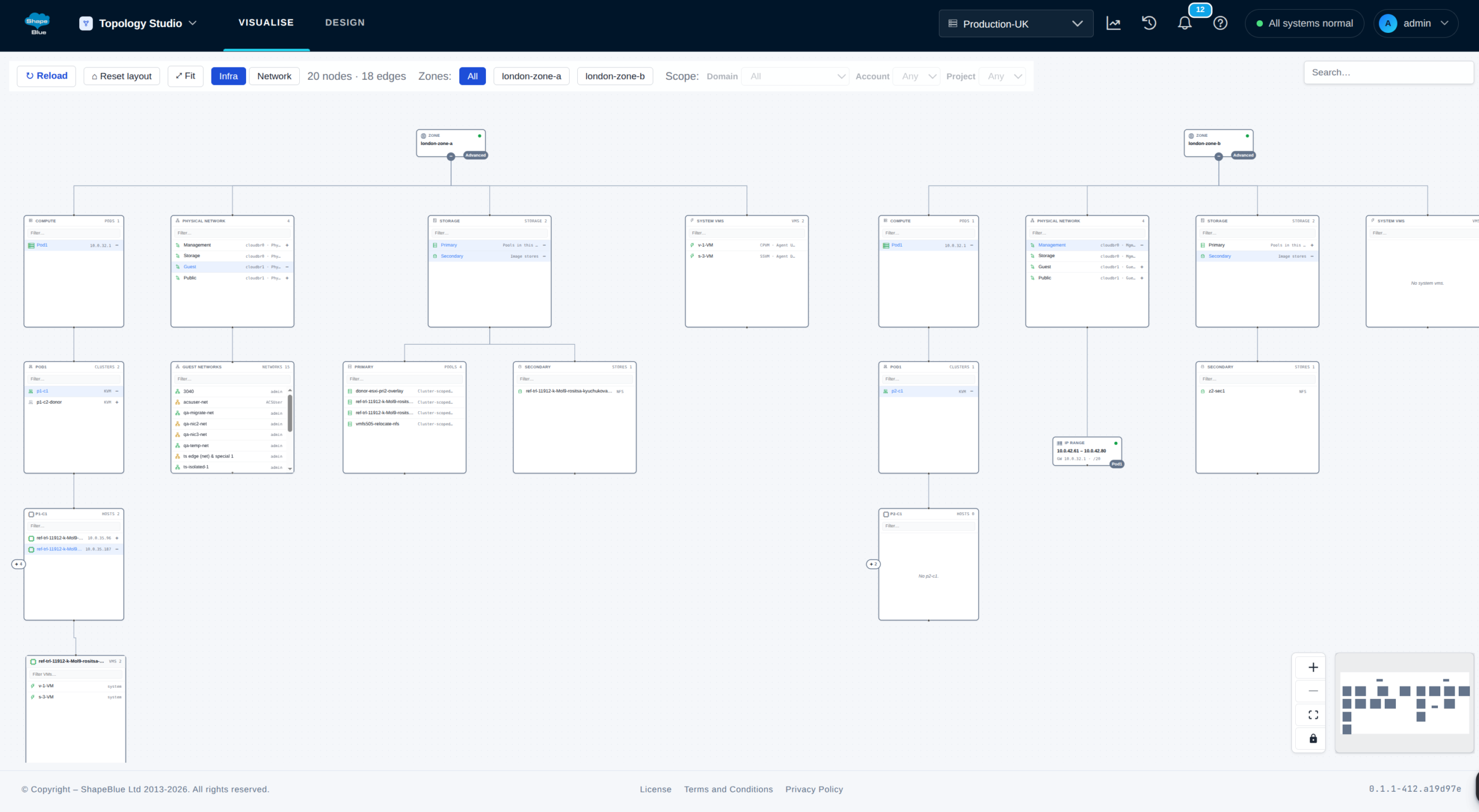
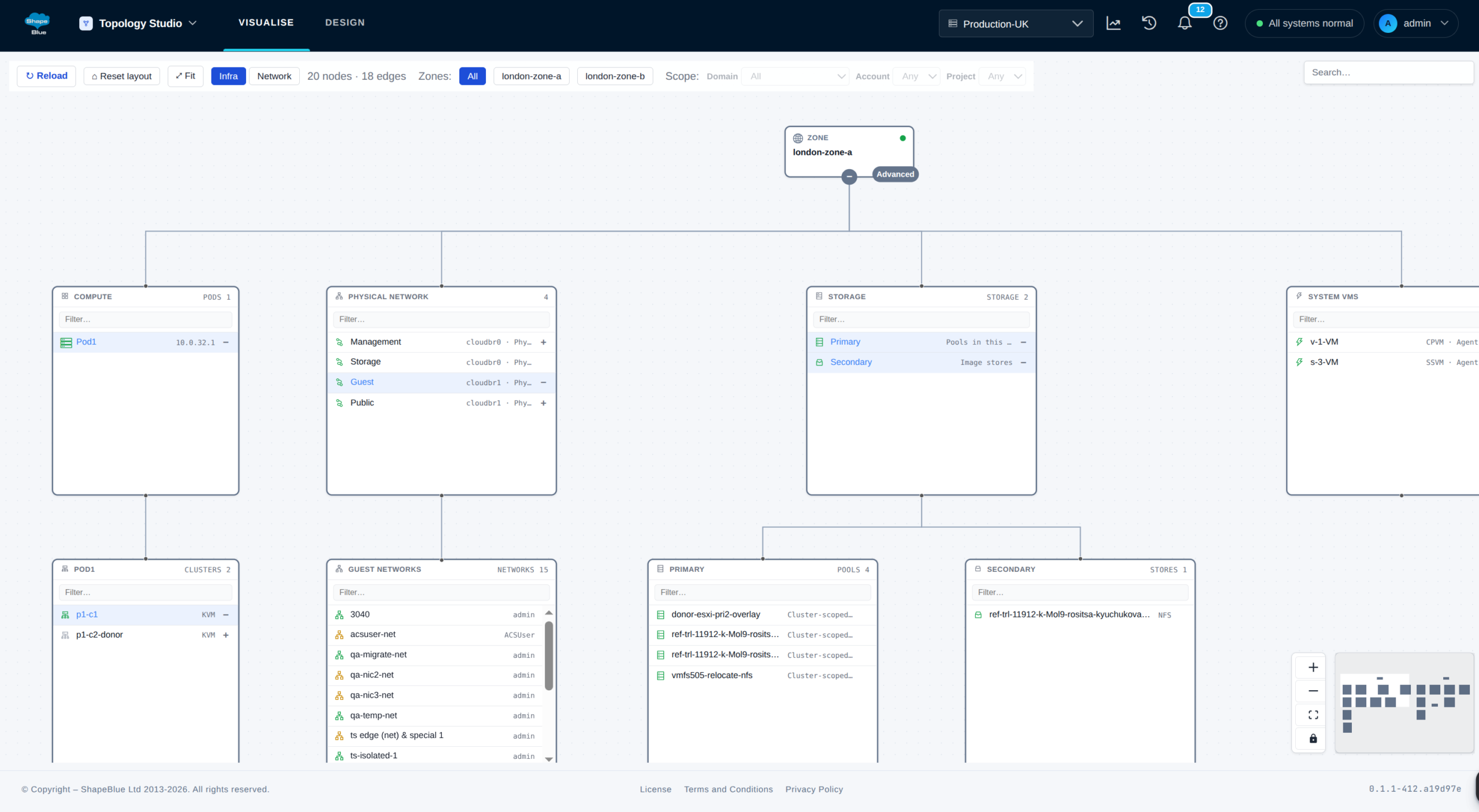
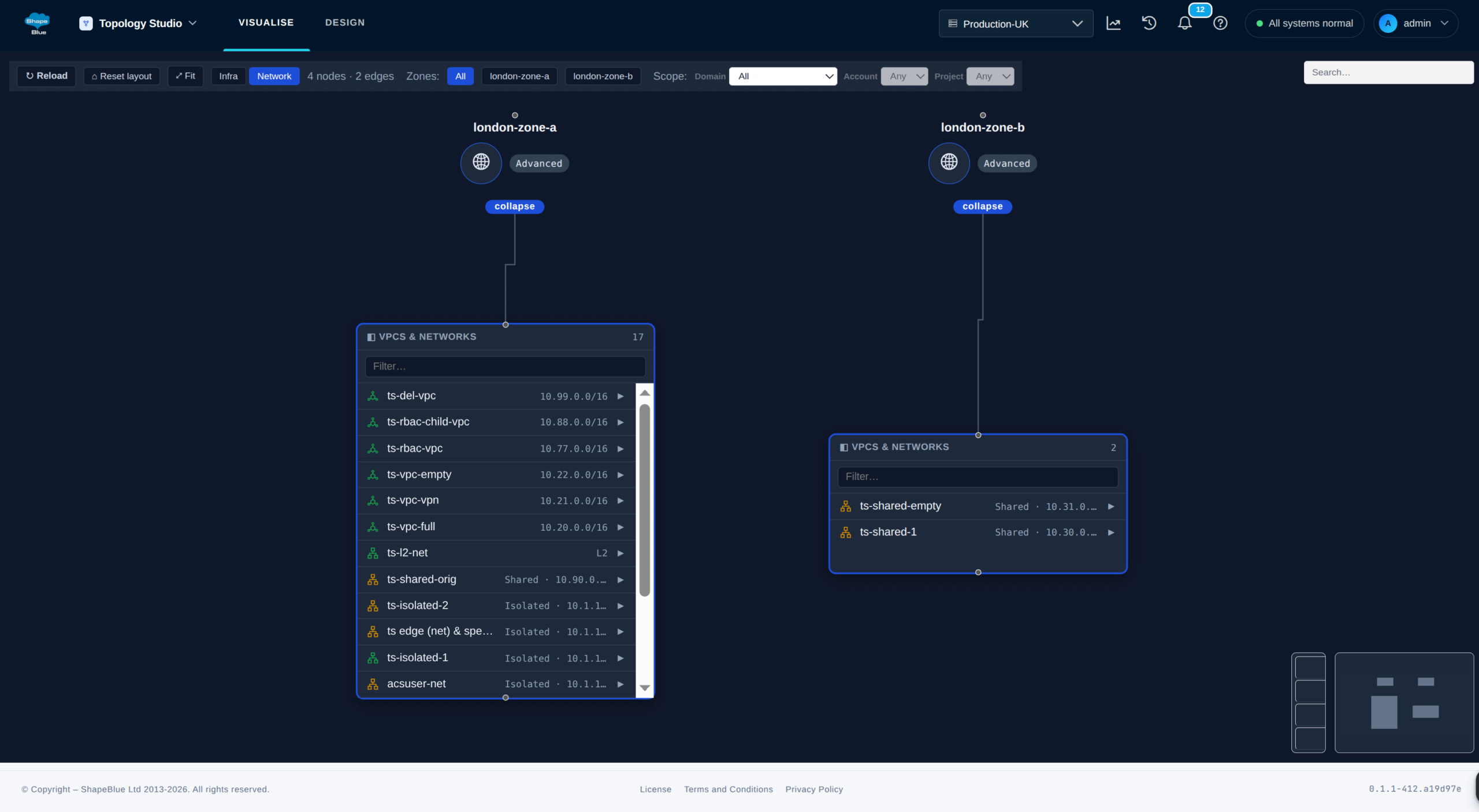
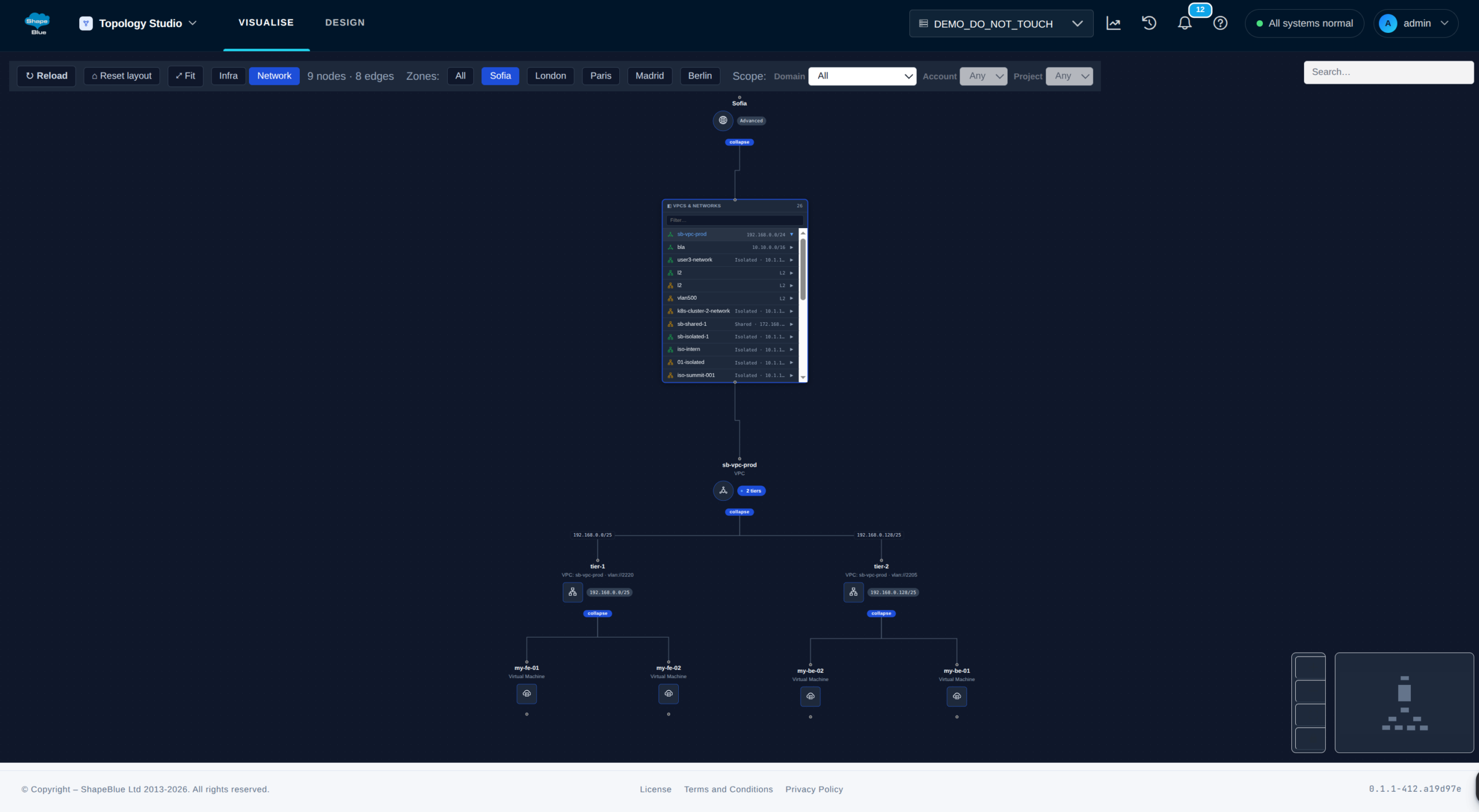
ShapeBlue Topology Studio’s Infra view maps live Apache CloudStack compute, storage and physical networks. Network view shows how guest networks, VPCs, routers and VMs connect. Design mode validates network designs against CloudStack rules and exports Terraform configurations or CloudMonkey scripts.

Infra
Your physical infrastructure, as an administrator sees it. Open a Physical Network to see the Guest and Public Networks it carries, and the Virtual Router behind each Guest Network.

Network
Your tenants’ networks. Open a VPC to see its tiers, then open a tier to see the VMs running on it.

Design
A canvas for drawing new guest networks. The palette offers only what CloudStack allows inside the object you have selected, so nothing can be placed where it does not belong.
ShapeBlue Topology Studio at a Glance
ShapeBlue Topology Studio gives you a live, read-only map of your Apache CloudStack environment. Read-only controls are enforced in the code, preventing the tool from creating, changing or deleting CloudStack resources. Infrastructure and network relationships are drawn for you, so you can understand the deployment without piecing it together screen by screen. Design new guest networks or import existing ones, then export them as Terraform configurations or CloudMonkey scripts. You can review, version and reuse the output, and run it yourself when you are ready.
Try ShapeBlue Topology Studio
ShapeBlue Topology Studio is available as part of the CloudStack Infrastructure Support service.
Interested to learn more about ShapeBlue Topology Studio or give it a try? Get in touch with our team and book a personalised demo.
Frequently Asked Questions
Can Topology Studio change anything in my CloudStack environment?
No. Every call is checked against an allowlist of list* and query* commands before credentials are resolved and before anything is forwarded. The Go backend is the only component that talks to CloudStack, and the frontend never calls it directly. This is enforced in the product’s own code rather than by the permissions on the account, because the appliance issues full-admin credentials.
Does Topology Studio need its own login, or its own database?
Neither. It runs as a product on the ShapeBlue Appliance and reuses the CloudStack environment credentials your organisation already registered there. There is no database to provision or back up: a design is a file you download and keep.
Does it replace the Apache CloudStack UI?
No. CloudStack’s own UI is where you manage resources. Topology Studio answers the questions that span many objects at once: what a whole zone contains, which network a VM is on and which router serves it, what a tenant network would look like before you build it, and how to hand a colleague the script that reproduces what is already running. It never issues a change of its own, in either mode.
Can I design physical infrastructure with it?
Not on the canvas. Visualise draws the physical layer from the zone down, through pods, clusters, hosts, storage and system VMs, all discovered live. Design authors the tenant layer: guest networks and everything inside them.
Will the exported Terraform try to recreate what already exists?
No. An Exact copy export appends an import {} block for every resource that carries a CloudStack id, so Terraform adopts it into state. A Template export targets a different environment and has nothing to adopt, so it never carries import blocks.
Can it compare a design against what is running right now?
Not in this release. Exporting a design ships now. Diffing a design against a live environment is planned for a later release, and we would rather say so than imply the feature is here.
Does it work with more than one CloudStack environment?
Yes. Everything on screen comes from the CloudStack environment currently selected in the picker in the top bar. If your appliance has more than one environment registered, open the picker to switch, and the screen reloads against whichever you choose.
How do I get it?
ShapeBlue software tools are available as part of the CloudStack Infrastructure Support service. Get in touch and we will show you Topology Studio against an environment shaped like yours.